How to get my images in Google - add/upload photo to Google Image Search

How to put your image on Google
Hi everyone!
My name is Daniel and I often answer questions on the various Google help fora.
This is in addition to main job as webmaster, content creator and web designer (see one my awesome websites here)
One of the questions I see being asked repeatedly is:
" How can I put my image or photo on Google? "
and
How can remove a photo from Google?
For uploads, most people are looking for a form or upload page where they can somehow insert their images onto the search engine. As some people will already know, that isn't how things work and currently it is not possible to upload a photo or image directly to Google.
I will try to explain how it all works, how to get your image/photo onto the search engine and more importantly, how to get them to appear when your chosen keywords are searched.
First things first: There is no way to upload directly, that means no upload page, no form, no email address etc.
---------------------------------------------------------------------------------
Do you want to earn money by writing articles here on Hubpages?
Interested? Sign up for FREE here.
---------------------------------------------------------------------------------
So how does Google find these images?
Google will visit web pages they discover on the web automatically and include them in the search results along with a snippet of text. Well, the Image Search Engine works in a similar manner. It gathers images and photos from other websites and adds them to a list which can be searched by entering keywords into the search page.
In other words, your image needs to be placed on a website that Google can access.
How does Google know what keywords to associate with my photo?
Google looks at the web page where your image/photo is located and they examine the keywords in it's vicinity. So if you have a photo with some text close to it about [ john doe ] then that image will likely show up when you search for [ john doe ].
Looking to remove an image from Google? This page explains how to remove a Facebook image from the Google search results.

Example of image search result
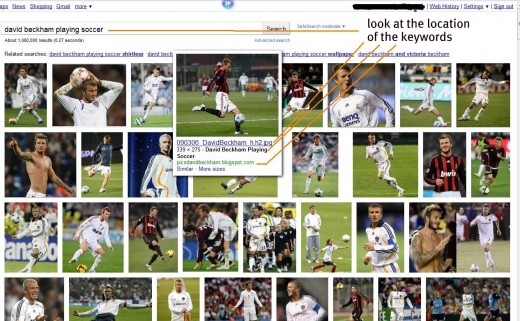
Steps you can take to get your image on Google
If you have a website or blog then great, you should be able to get your content on Google without too many problems, even if you are using an image hosting service such as Flickr or Picasa then have a read of my tips, some or all of it will be helpful:
PLEASE NOTE: You do not need to follow every suggestion here, these are just the "best practices" to help Google locate your image.
1) Make sure you use an "alt tag" on your image, that stands for "alternative text" and is where Google will look for keywords so they understand your image. Please remember that Google is really a computer program and it cannot "see" your image, it only sees text.
The following will help web designers:
If you have a photo of John Doe at a Christmas party in Seattle 2008 then your alt tag should look something like this:
<img class="left" src="/EXAMPLE. jpg" alt="John Doe at work Christmas party in Seattle 2008"/>
2) Are you placing a photo on a website for the first time? I recommend renaming the actual filename to something descriptive.
23344.jpg <-------Not very descriptive
john-doe.jpg <--------Much better
Please do not rename existing photos/images on your site as this may cause you issues, such as "file not found" errors and should only be done by professionals who fully understand the repercussions of changing filenames.
If you have only just taken your photo or you are yet to upload it to a website then yes, you should rename it to something better.
3) Whether your image is on a website you own or a site such as Flickr or Picasa you can still get it to appear in the search results, fill any descriptive fields with honest text that describes the content of the image. If you can, try to include some text near or as close as possible to the image itself, create a heading title if you can.
4) Make sure Google has discovered your webpage or Flickr page etc. If they have not discovered your site then they will not be able to see it's content! You can help Google locate your image on the web by promoting your site and getting links to it from other pages on the web. As soon as Google locate a crawlable link on another site, they will visit your site/page and hopefully see your content.
5) Check privacy settings, if you are using Picasa or Flickr etc to host your image then make sure your image is publicly available, blocking search engines with strict privacy settings will cause you problems.
6) Links from other sites or even your own site. When Google discover links directly to one of your images they are far more likely to show it in the results. If your image is really top quality then surely it will have multiple links pointing to it from your own site and over time will attract links from external websites.
Troubleshooting (a must read)
1) Avoid using adult or sexual words on your webpage! Google uses a Safesearch filter that scans the page and if any such words are located then your image may be removed from the Safesearch results. The occasional word is okay but avoid too many instances.
2) Bad neighbourhood - if your site or blog is in a bad neighbourhood and is associated with spammy or adult themed websites (perhaps by sites you link to?) then that may cause issues.
3) Duplicate filters - Google try very hard to filter out copies of the same image, use originals or accept that your image is not unique and doesn't deserve traffic from search engines. Do not steal someone else's copyright image.
4) Keyword stuffing - yes Google does look at the text of a webpage to understand it's context but repeating the same word or phrase over and over again is likely to trip a spam filter and your image or even your entire web page may never appear in the results.
5) Patience - It can take weeks or even months for images to appear in the search results. I put some images on Flickr in July and only in September were they visible in the search results.
6) Link spam. Don't be tempted to buy tons of spammy links pointing to your site or image in an attempt to fool search engines into thinking your site/image is more popular than it really is. Google employs the very best computer programmers from the top universities so they can create filters to detect such practices. They even have a dedicated spam team (do a search for Matt Cutts)
It's not just about keywords
Because there are so many images on the web with keywords on the same page, Google now looks at other factors as well, such as the popularity of the web site.
You may have great photos and your blog/web site may be fantastic but if it is not very popular (not many links to it from other quality sites) then chances are some of your images will appear below those from other more well known sites.
The more established your space on the web becomes the better it will perform in both the normal and image search engines.
More from this author
- How to Upload Photos
Tips on how to upload photos to the internet and from an SD card or camera. - Quotation Template - How to Write a Quotation for a Customer
- How To Get An Image In Google
A simplified version of these tips can be found here. - Pimsleur Russian Review - Impartial Review Of This Russian Language Program
Back in December 2009 I started my first language program - Rosetta Stone. I hated it! Every aspect of the program annoyed me, from the photos that were difficult to understand, to the voice recognition... - Remove Defamation From Google
There are various reasons why you may want to remove certain information such as defamation from the search results. Because it may affect your chances of getting a job, because you don't want friends and... - How To Remove The Google Redirect Virus
How to remove the Google Redirect Virus - How to remove an image from Google - by Daniel Roo
I recently created a Hub on how to add an image to Google so I thought it would only be fair to create one offering advice on how to remove an image from the search engine too. Please understand that there...